Pages

▼
Drop Down MenusCSS Drop Down MenuPure CSS Dropdown Menu

Traveling Safe: Help Rescuers Help You and Get Your Phone Back


Make it easy for someone to return your lost phone or contact your family in an emergency by putting your emergency contacts' information on the lock screen of your phone. I believe that 95% of people are good, honest people and will return your phone if they can. You can also add pertinent medical information like any allergies you have or medications you are taking. There are several ways to do this, and I'll walk you through them.

This post is written for iPhones but I assume there are similar apps and options on Android devices.


The easiest, fastest method: Using the Notes App

  1. Open the 'Notes' app on your phone. 
  2. Hit the return key until you are almost halfway down the page
  3. Type in your information, making sure to bold the most important items and using the space bar to center your text
  4. Take a screen shot by pushing the round home button on the bottom of your phone at the same time you push the lock.on/off button on the top of your phone
  5. Exit the 'Notes' app and open the Settings app.
  6. Scroll down to 'wallpaper' and click 'choose new wallpaper'
  7. Find the screenshot of your notes page, turn perspective zoom off and move the image until the lettering is just below the middle of the screen and hit save. 


The prettiest method: Using the 'Word Swag' app
  1. Go to the App Store and download the 'Word Swag' app ($3.99)
  2. Pick a pretty photo from your camera roll that was taken vertically and select 'don't crop' or go online and google pretty photos like clouds or stars and save the image to your photos by holding down on the image until 'save image' appears. 
  3. Type your text into the custom text area, making sure that the 'auto line breaks on' button is slid to the left to turn it off
  4. Use the return key to separate the lines of text
  5. Once you have your text typed in, click 'save & close'
  6. Now you can play with the style, color and size of the text. Remember your phone will zoom in so you want some room on either side of your text and your text to begin just below center of the screen. 
  7. Click 'Done' 
  8. Go to your 'Settings' app and scroll down to 'wallpaper'
  9. Select the photo you made in word swag, turn perspective zoom off and move the image until the lettering is just below center of the screen and you can read all the wording. If your wording was too big, you will have to go back and start over. Unfortunately Word Swag does not allow you to edit previously saved photos. 

Traveling Internationally 

If you're headed abroad, download the local language to the keyboard of your phone while you have internet. You are downloading just the keyboard for that language, not changing your phone to that language. This means your phone will still be in English and your default keyboard will be English. To switch languages while writing or texting, simply click the little gray globe at the bottom left near the spacebar.

When you arrive, enlist a local friend to help you write your information in their language. Make sure that the number listed next to the local language is someone who speaks it fluently and knows how to contact you and any other important information about you.

On the screen to the left, the number next to 'English' was my local cell phone number- a little brick Nokia.  The number next to the Arabic and French number was my Moroccan country director's number.


Medical ID and Health App

Don't forget to update your Medical ID in your Health app (iPhones) and enable Medical ID to show on the lock screen. This is important if you have 'push notifications' enabled on your phone. If you have recently received a text message or other notification and you have not looked at it, the background you're about to create may not appear. The only way for rescuers to access important information is through the Medical ID


Pimp your PFD - Personalize your Kayaking PFD

Your PFD is your personal flotation device, so you should make it just that; personal!

PFD life jacket safety accessories
What the Law Requires
All kayakers are required to have a PFD by law. There are a few other items the Coast Guard requires us to carry to be legal. These include:


  • a sound producing device
  • a signaling device
  • a visual distress signal
  • a navigational light


  • Meeting Those Requirements 
    The law doesn't provide definitions for these items and doesn't direct the paddler on where they should be stored. There is definitely room for creativity. Here are a few options to fulfill those Coast Guard requirements:


  • sound producing devices: whistles, air horns, conch shells
  • signaling device: SPOT GPS device, cell phone, VHF radio, lights, flags, paddles, mirrors, flares
  • visual distress signal: flags, paddles, mirrors, flares
  • navigational light: deck light, headlamp, flashlight

  • What I Carry, Where I Carry It and Why
     
    So where should you store all that stuff? In a dry bag in a hatch? In a deck bag? On your PFD? Here is where I keep it all... I have all of these things, either in my kayak or on my body. Here is what I carry:

    In my PFD

  • Rescue Howler Whistle
  • Floating Signaling Mirror
  • Petzl E+Lite Headlamp
  • NRS Co-Pilot Rescue Knife
  • lip balm
  • Sunscreen
  • Cliff Bar
  • On the Deck

  • Baja Deck Bag
  • VHF Radio
  • Deck Compass
  • Big sunscreen
  • iPhone in a Lifeproof case
  • Rehydration salts
  • Spare paddle
  • Bilge Pump
  • Paddle Float
  • In my Pelican Box

  • 1 glowstick per kayak
  • Air horn
  • Flares
  • Spare batteries
  • Emergency phone numbers
  • GPS
  • Map
  • Compass

  • In emergency situations, having these easily accessible can mean the difference between life and death. They should never be stored in a hatch, where they are very hard to get to. In a worst-case scenario, the paddler is a swimmer without a kayak. In this scenario, it is important that the paddler (now swimmer) has the essential equipment to survive. I don't keep my VHF radio on my PFD because I know that the conditions I paddle in are unlikely to separate me from my boat. If you are paddling alone or in rough water, you absolutely should have your VHF attached to you.

    You should equip your PFD with essentials based on where, when and what you will be paddling. Keeping a marine radio on your life jacket while paddling a quiet cypress swamp is overkill. Keeping it on your PFD while paddling in open ocean is definitely not. When in doubt, over-prepare. Many guides in colder environments keep emergency blankets in their PFDs. Some guides even tether a dry bag with fire making materials and extra clothes to themselves!


    life jacket safety accessories PFDAttaching things to your PFD
    This is where things get tricky.  It can be hard to get all of this stuff to fit, especially if your PFD has only a pocket or two, like mine. There are ways around this. One of them is the carabiner trick seen below. Don't be afraid to add knife attachment points or clips to your PFD, just make sure you mess with the flotation and make sure your modifications won't get you tangled or caught on anything. It is also very important not to overload your jacket with too much stuff. Your PFD is meant to keep you afloat. Do not sacrifice crucial buoyancy for unnecessary equipment.


    A carabiner on the shoulder strap can be a great way to hang  your whistle and lip balm. I know many male guides who do this. This trick works great for people with broad chests, but I found that the carabiner rubbed against my arm when I paddled.  I replaced the carabiner with a loop of 1/4" bungee cord.


    sea kayaking life jacket PFD signaling mirror
     I keep my mirror on a lanyard. If it's so bad that I'm using a mirror, it's bad enough for me to loose it if it isn't tied to me.
    I often keep a cliff bar or cliff shot in there too, for fast fuel. I have to take any snacks out every night so mice don't chew into my PFD. Raccoons will steal life jackets out of kayaks if we leave granola bars in them.


    PFD life jacket rescue knife co-pilot NRSMy knife is the NRS Co-Pilot Rescue Knife. I use it to cut birds and turtles free from nets, cut anyone who gets tangled in anything free, and to spread Nutella on my bagel at breakfast. Having a rescue knife with a blunt tip is crucial. Never attempt to free anyone with a pointed blade. It often ends in tragedy. Consider using bungee to connect your knife to your PFD to avoid dropping it during rescues.

    Trick it out for Comfort and Safety
    Be Seen
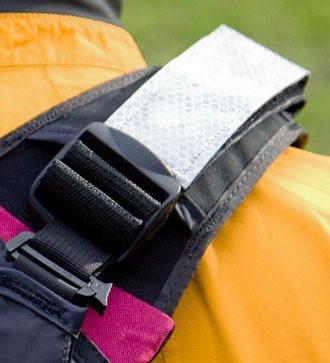
    If your PFD doesn't have any reflective strips on it, adding reflective strips to the shoulders is a must for better visibility. Reflective strips for PFDs are available from:


    Stay Hydrated
    With a hydration bladder, you won't have to sacrifice your pace and rhythm to stay hydrated. The NRS PFD Hydration Pack straps to most PFDs and can be worn as a backpack when off the water. Kokatat also makes the Tributary Hydration Bladder but it will not fit many of the PFDs on the market.


    Storage Solutions
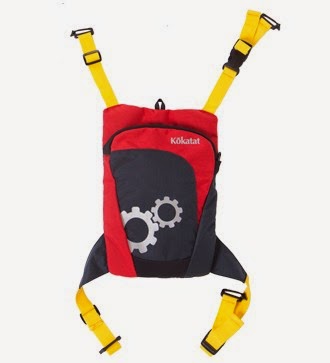
    If you just can't fit everything onto your favorite PFD, there are several solutions. Kokatat has a variety of options that strap to Kokatak brand PFDs, that may also work with other brands.

    The Tactic Pack straps to the back of a PFD, has room for a hydration bladder and a VHF radio, and cleverly unclips to allow the wearer to access those items while paddling.

    The Belly Pocket attaches to many PFDs with front adjustment straps and keeps important items handy.


    Did you find this post helpful? Do you enjoy reading this blog? Help me keep it going by buying me a 'coffee'